Company Culture

Community 

“I liked them so much, I joined them,” said a current project manager who worked closely with our team during his previous job.  

This quote exemplifies how we at Spring value a community that extends beyond our team. The individuals we serve are a piece of that community. We are built on teamwork, beginning by treating customers like they are a part of our team. Our shared purpose: “To Have Fun Building Legacies Together,” guides our actions daily. These characteristics contribute to our company culture.  

Company Culture

Finding a company whose culture aligns with your views is highly sought after when looking for a new job. Company culture can be defined as a set of shared values, goals, attitudes that characterize an organization. Although we have set values as a company, the values are steered not only by the company’s leaders; but also through our employees’ unspoken behavior.

Many companies are facing new challenges during the COVID-19 pandemic. According to the Stanford Institute for Economic Policy Research, “42% of the U.S. labor force works from home full-time.” A significant concern among leaders is the continuation of collaboration and communication between co-workers while working from home. We confront this issue by celebrating each other’s successes through company-wide meetings where each department has the opportunity to share highlights from projects, employee recognition, and company news. We cheer each other on and take pride in everything we do. We are always there for one another and strive to sharpen our team. Virtual team events also occur throughout the week, creating time for team members to pause their work to build relationships. Over the past few months, our leaders have ensured that employees have the tools to continue to succeed in their role, whether that be a computer monitor for their home office or extra hand sanitizer and a face mask for on-site. 

According to the 2020 MHI Industry Report, “56% of companies find it challenging to hire or retain qualified workers.” Company culture is essential in the retention of employees in this fast-growing industry. We are excited to continue to grow as a team and as individuals. Are you looking for a new opportunity in Material Handling? Reach out to us today. 

Connect with us at sales@springautomation.com to learn more about creating a partnership with our team.
 

Our Virtual Office

We're on week #6 of working out of our virtual office. Here's a quick video on how we are remotely working together to accomplish our projects while still hanging out as a team.

Music by bensound.com

Preventing Last Minute-itis

The curse of the modern office or workplace is Last Minute-itis.  It is wasteful of our time, increases our stress, and the errors that are made cost us a fortune.  Even if this wasn’t the case, how many of us can say that they like to be rushed – even if it is work that we usually enjoy doing?  We can’t always do much about disorganized coworkers, demanding clients, and the procrastinators around us.  But don’t despair, at least we can make sure that we are not sabotaging ourselves.  Here are a few methods that we can use to help reduce the occurrence of last minute-itis.  These all seem like common sense and they are.  But how often do people violate what they know is common sense and do something because they think it is easier, it will be different this time (the definition of insanity), or they are too tired and don’t do what they know they have to do?

Last things first – there is a famous Lewis Carroll quote (or was it the Cheshire Cat?): “If you don’t know where you are going, any road will get you there.”  A corollary is “If you don’t know what you are trying to accomplish, it doesn’t matter much what you do."  Countless hours are wasted producing products or doing jobs that either don’t need to be done or you are working on something that really isn’t what the customer wants.  Client’s often ask how long it will take or what it will cost to do something.  I have to ask them first “What do you want it to do”?  They might not know, and you might have to provide them with guidance.  After you get their answer, produce a prototype or use an example from a previous job and ask the client if this is the result they are expecting.  You can save a world of time by doing this and avoid costly errors.  You may even earn the admiration of a customer because you asked them what they really wanted.

Embracing the Process – Once we know what we are trying to accomplish the next question is how is it to be done.  The process engineer is taught to think backwards, and you should too.  Starting with a result will direct you to think in reverse.  What do I need to achieve the product?  Then go the next step repeatedly until you reach base information.  Insert the checking, review, and validation steps until you have the entire process mapped out.  Whether you do this on a whiteboard, in a graphics program – like Visio, mind mapping software, or just scribbling on paper - mapping out the process and following it is a sure way to get the result that you want.

Everything in order – After you have defined the process, now stick to it.  As a controls engineer, I have often worked with programmers.  Programmers love to write code.  That’s what they do.  But there is a time for everything.  Make sure that you have the foundation work done first and get an agreement that this is really what the client wants or needs before wasting time producing something unnecessary or unwanted.

Hurry at the beginning - when you have the time.  It has often been said that “hurry is the
sign of a weak mind”.  I don’t really
know you but if you are reading this
article you don’t have a weak mind.  People
tend to get more dedicated to a project the closer they get to the due
date.  This is because at the beginning
the objective is so far away and the time seems limitless.  There is nothing like having a schedule with
firm due dates to ensure that work is getting done in a timely matter and that people
are working to avoid entering a crisis mode the last week of the project.  Make sure that the work is broken down into
discrete tasks that can be completed.
Assume that there will be problems, and leave yourself time to fix them
as they arise.  There is nothing as
enjoyable as reaching the end of a successful project and knowing that it was
accomplished without a frantic dash during the last few weeks to get it done.

First things first – There is work that we have control of and work that we have little or no control of.  Let’s be sure to identify what we have no control over at the beginning of the project.  As you have less control of items that come from others, you will have to put a structure in place that will allow your suppliers time to get the information to you in a timely matter.  Ask yourself if the materials that you have provided to your supplier define what you want.  Are there areas in the documentation that might be confusing?  Do they have enough time to provide you with the product that you need?  Anything that you receive from an outside source must be checked.  It is your job to make sure that the product that you receive is checkable (more about that in the next article).  If mistakes are made (either by your supplier or by you) is there enough time to redo the work and still meet the deadline?

Avoiding what we like to do – There is work that we love to do
(work that puts us in “the Flow”) and work that is necessary but not our choice
to do.  If there is something that must be
done, and it cannot be delegated to someone else, learn to avoid doing just the
work that you want to do because it feels good.
If you have done a good job of formatting the project, you will have
time to do the work that you love doing.

Painting yourself into a corner – We all (at least most of us) have this surge of expectations when we start a project.  It just feels good to be doing something new.  We have all gone through the steps of defining a concept, getting the client’s buy-in, and working on the project.  But what if it doesn’t work as we imagine.  Do you have a plan “B?  What is the worst that can happen?  Make plans to resolve these problems and prepare for the worst.

Now that you have my ideas, apply them and your own ideas toward being more effective.  I would like to hear your comments about what you have found to be effective.

Mark Goldstein, P.E. - Senior Controls Engineer

Mark joined Spring in 2015 and has been a key contributor to the business. Prior to joining Spring, he worked for consulting engineering firms, control system integrators, manufacturers, and OEM’s in Tennessee, Georgia, Texas, and Missouri, in various roles, including process engineer, project engineer, project manager, and department manager.

He is a licensed professional engineer and has completed project work consisting of engineering, design, programming, installation oversight, and commissioning.

Mark Goldstein

SCRUM: An Efficiency Tool

“Scrum is a framework within which people can address complex adaptive problems, while productively and creatively delivering products of the highest possible value” - scrum.org

At Spring Automation, we focus on delivering quality systems in a timely manner.  Our ability to keep a consistent level of execution is via a system called SCRUM. While many companies use SCRUM to complete software projects, we use it as an engineering management tool for controls.  Projects are broken down into bite-sized tasks, those tasks are added to sprints, and those sprints are completed on a weekly basis. The SCRUM master is the key holder to all this information and, along with an Engineering Lead’s help, plans the next sprint weekly.

Scrum Overview

Scrum Steps to Milestone

What’s unique about a SCRUM system is that instead of (1) engineer taking on all the tasks for a given project, every member of the team can work on any task added to the sprint that is within their skill level. Additionally, productivity is increased because is it very clear what tasks are available to be worked on.  The engineer’s question of what they need to work on next is eliminated. This is very important to the Spring culture as our engineers enjoy both flex time in office and remote working when on a job site.

A sprint is all the work that needs to be completed during a 1-week period.  The SCRUM master calculates the availability of every team member and plans out how many hours can be completed in each sprint. This availability is reviewed and adjusted on a weekly basis. Based on the project milestones communicated by our PMs, the SCRUM master will add tasks to the board based on what is vital to project execution.  The goal is to complete all tasks by the end of the week. When all tasks are met then all milestones and deliverables will be complete

An Example

SCRUM Timeline

Let’s say we receive a project has 300 hundred specific tasks.  From designing the layout to creating the HMI screens, each task is written down and given a number.  The number assigned to a task reflects an estimate for the number of hours that the task should require.  This number is based on historical data from past scrum cards, as well as our Engineering Lead’s expertise. So, based on the availability of the team and the number of hours available to be complete, the SCRUM master adds the necessary tasks to the Sprint.

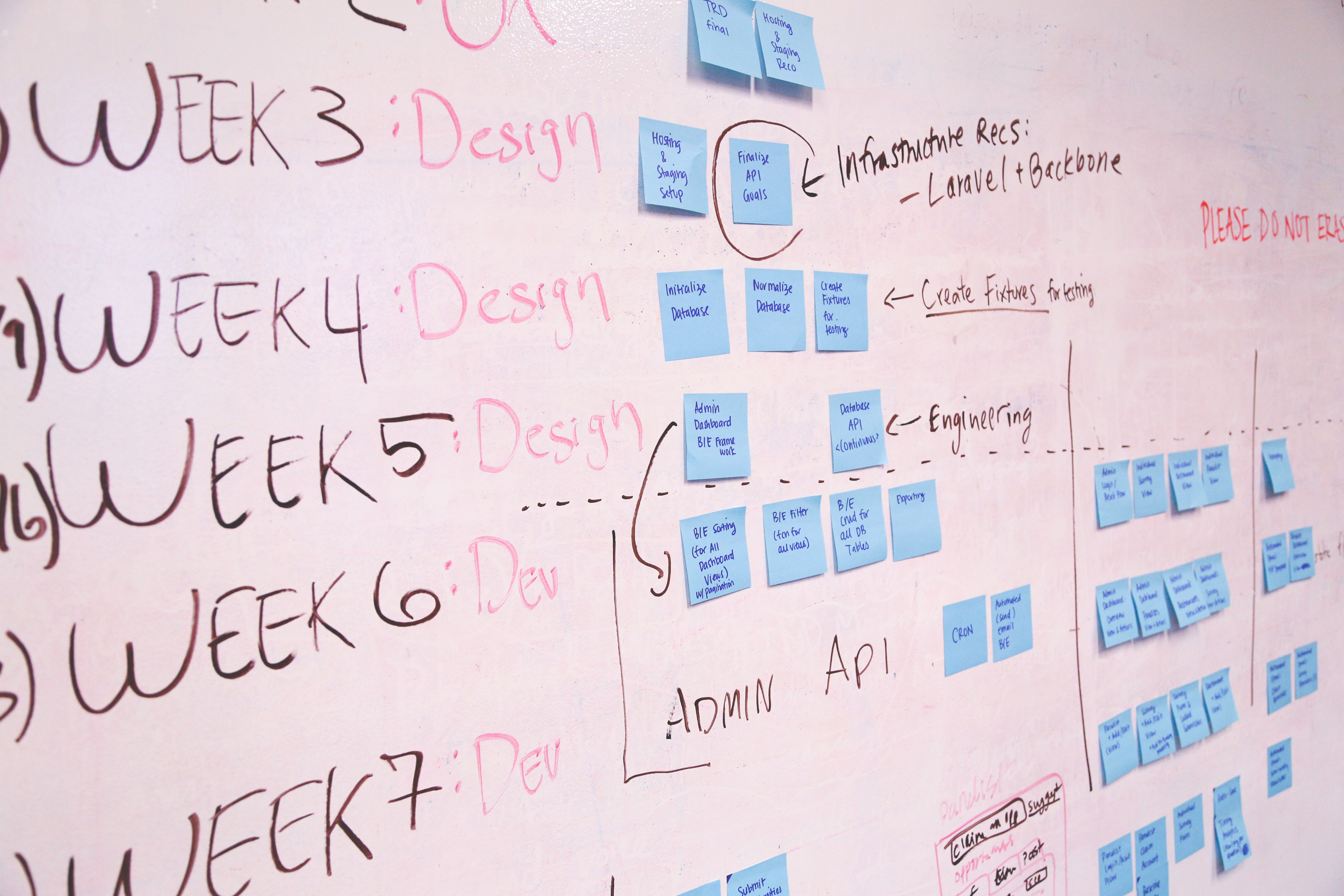
All these tasks are available on a virtual whiteboard on virtual post-it notes.  When an engineer wants to work on a task, they simply take that “post-it” and complete it.  The virtual whiteboard is great because the Engineering Lead can see what every team member is working on at any given time. Once a given task is completed, it then gets verified by another team member.  If the verification reveals an error, the task is put back on the whiteboard to be reworked.  If the verification reveals the task is complete, it is taken off the whiteboard and the engineer can grab another task.

The Benefits

Having such a detailed ability to plan and track each task is helpful for a couple of reasons. The first reason is the Operational Team can see in real time what tasks are complete, what tasks are behind, and how much of the project is left to complete.   We have also been able to integrate our templates and procedures into each task, allowing for quicker training and better standardization. Another great benefit is this allows the Sales and Estimating Team to gather great feedback on hour estimates for new projects based on true and accessible historical data.  All in all, SCRUM has become a vital tool for Spring Automation and has given us a crystal-clear view of the life of every project. It has made us a more efficient and productive team, and perhaps it could do the same for yours. I encourage you to do some more research into the SCRUM methodology and see if it can be helpful to your team.

Be Prepared: Commissioning 101

Give me six hours to chop down a tree and I
will spend the first four sharpening the axe
.”

-Abraham Lincoln

Many times, I’ve been in the field at a job site, and on the first day, I’ll find
some issue that I might not have the necessary tools to fix.  These issues vary depending on the scope of the project, and even though I primarily focus on electrical issues, mechanical issues can pop up with electrical equipment.  A disconnect on a control panel may have been damaged during shipment, or a few bolts might be loose on a panel.  I’ll find myself asking someone else for tools or having to leave the site to purchase tools or equipment.  A controls engineer cannot predict every issue that may arise or carry enough tools to cover every scenario, but one can be well prepared for issues that do occur regularly in the field.

Create a Checklist

In any occupation, it is imperative to have the necessary tools to do the job.  Preparing a checklist is a great way to verify everything needed is packed and ready to go.  For a controls engineer, several tools are vital to have when commissioning a system.

  • Multimeter
  • Laptop and Charger
  • Ethernet cable
  • Wireless router
  • Batteries (AA, AAA, 9V)
  • Screwdrivers (Terminal, Philips, Flathead)
  • Crescent wrench or wrench set
  • Plyers (wire cutting, needle nose, wire strippers, etc.)
  • Tachometer (for checking speeds)
  • CAD drawings (printed)
  • Pens for redlines on drawings

Inspect Tools

Routine inspection of tools should be done to ensure functionality and safe operation.  Tachometer and multimeter batteries must be inspected frequently.  It may be easy to forget, but it can be critical to inspect the laptop charger every so often for signs of damage.  A laptop charger or cord can easily be damaged onsite and may not be obvious without careful inspection.  The charger is the lifeline of a laptop, and it can really slow down the commissioning process if a controls engineer must wait on a new charger to come in.

Create Testing Procedures

Making a standardized testing plan is another great way for a controls engineer to be prepared.  Having a clear, organized testing plan can really help the commissioning process go quickly.  The testing plan should have some form of a checklist that allows the user to track the commissioning process.  This plan should be easy for others on the team to interpret since, often, at some point in the commissioning process, there may be a handoff to other controls engineers.

Conclusion

In any profession, especially controls engineering, one needs to be well prepared with the tools he or she needs to be successful.  Creating a checklist and inspecting the tools on that checklist can save time and money.  Forming a standardized testing procedure is a great way to streamline the commissioning process and will lead to a project’s flawless success.

Josh Shoemaker - Commissioning Engineer

Josh Shoemaker joined Spring Automation in June 2018. He has commissioned several projects since and has been involved in project design as well. Josh has worked to improve our commissioning process by developing a standard commissioning tracker for the team to use. This tracker helps keep the project manager and other team members up to date on the progress of commissioning and installation.

Prior to Spring, Josh interned for a heat exchanger company and worked with the R&D department testing an application of evaporative cooling. He had to wire sensors and help design an experiment based on engineering concepts using Allen Bradley testing equipment. Several of the experiments involved a wind tunnel. Josh’s team was able to develop an evaporative cooling system that is currently in the patent process.

Josh Formal - SQUARE

Communication: Simplify

“The ability to simplify means to eliminate the unnecessary so that the necessary may speak.” - Hans Hofmann

Have you ever had to recover from a misunderstanding? Some of the greatest challenges I’ve experienced originated from a simple lack of understanding. We’ve all seen examples: projects with clear expectations tend to race towards success, and projects full of surprises tend to struggle along.

If so many past examples exist, then why do we keep running into the same issues again and again? How do we get communication back on track with our customers, our vendors, or our very own team?

Have Purposeful Meetings

  1. The Kickoff: I can’t begin to express how a kickoff meeting can make or break a project. Whether with your internal team or your client, a kickoff meeting helps provide scope clarity, schedule confidence, and an early start for other important conversation.
  2. The Weekly Call: These quick touchpoints are crucial for keeping a project healthy and stakeholders happy. Although short, weekly calls can help keep everyone on the same page. The frequency can also keep teams reactive to the latest developments.
  3. The Site Update: In my industry, we have in-office development and onsite execution. Maintaining a good pulse on site progress is extremely important. We aim to have our subcontractors and team members provide weekly or bi-weekly updates. Pictures, redlines, and progress checklists constantly flow from our sites to help ensure a clear picture of project health.

Maintain Clear Communication

  1. Short Descriptions: Have you ever seen an email that was over four paragraphs long? Were you excited to dig through all of those words? I suspect not. Let’s be concise with our thoughts; otherwise, no one may ever read them. The K.I.S.S. principle highlights the importance of keeping things simple. I encourage you to read more on it.
  2. Ambiguity Kills: You’re in a meeting and have the floor. You’re excited to show everyone your latest presentation. After twenty minutes of only talking, you look around and everyone’s eyes are glazed over. Keep the purpose concise, descriptions to the point, and the intended results clear.
  3. Clear Expectations: Have you ever left a discussion not understanding what was next? If you find yourself unsure that everyone is on the same page, kindly ask them to repeat back their understanding of the topic. That’s a quick way to ensure there are no misunderstandings.
  4. Face-to-Face Discussion: We are gracious when a person accidentally cuts us off with their cart at the grocery store. We’re a menace if that same person does it in their car during traffic. Removing a face or voice can remove the humanity entirely. During a tough situation, make a quick call first before blasting off that email. It could help an unnerving predicament go a lot smoother.

Try Tidying Up

Communication should be clean and tidy. I’ve learned the hard way that being unclear, ambiguous, or over descriptive doesn't benefit anyone. So let’s give the above pointers a shot. Try getting rid of a few superfluous meetings, and try adding a few intentional ones. Try removing those few extra sentences, and try honing your intention. You might be surprised at the impact it could make.

As always, feel free to comment with your own thoughts and suggestions. What communication habits have been helpful in your career?

Austin Studebaker, PMP - VP, Sales + Marketing

Austin joined Spring Automation in January 2017. Prior to Spring, Austin worked at two Atlanta based control firms focused on project management and onsite implementation.

Austin Studebaker Formal 2 - SQUARE

8 Key Steps for Automating Processes

It would be great if everything in life could have an easy button that we press and know that things will get done. This is especially true at work where there are tasks that are repeated daily, monthly, quarterly, and so on. The thing is that this can be possible with automating processes. There are abundant benefits of automation that vary from team-to-team. They can range from reducing errors in more complicated tasks to reducing hours spent on easier tasks, which allows for more time challenging team members to innovate.

I started at a company late 2016 that was very committed to developing and automating processes that gave me many opportunities to work toward innovation and process automation. This year our controls group is growing as its own company with the same focus on innovation that is fostered in our family of companies. With what we do, we found that there are many tasks that our job requires that are consistently repeatable within a typical project. Many of these tasks are not always overly complicated but often are very time consuming. With this is mind, we have disrupted many standard processes and created new tools to automate parts of our job. Automation has given us more time to dedicate to further innovation that we will continue to build on. I believe there are 8 key steps to take to automate a process that we will apply as we continue to develop more tools.

1. Determine Repeatable Tasks

Start by determining the tasks that are repeatable. Review the current processes in place and see if there are steps within that process that are repeatable. Maybe it is a task that is done daily, monthly, or on every project, but be sure to evaluate tasks that will be done consistently over time. A task may already be a part of a process but avoid trying to automate too much of a process at one time. It is easier to determine milestones and set goals for completion if clear tasks are set instead of trying to change an entire process with many steps that can be automated. During this phase working to have clear tasks to automate versus an overall process will make it easier for when development projects are being “ranked” for priority.

2. Rank Tasks to be Automated

There are many factors that go into why a task should be automated. It could be that the task is time consuming, results consistently have errors, team members find the task complex, or team members may be bored by an overly simple task, for example. During this time communicate with team members who follow the current processes to fully understand where the most impact can be made. The earlier that the team who will be developing, using, and maintaining a tool feels ownership over the automated tool, the easier implementation will be and more committed the team will be to complete a successful tool. Also, be sure to take into consideration that amount of development time that is expected for a new tool and process. Sometimes a current task that may be considered easy to complete can be the best to start with if it can be automated quickly. The time it takes to automate a process can be just as important to consider as the overall impact it is expected to have. Once the biggest needs are determined and balanced with time restraints and other factors such as resource availability, rank the tasks in the order that they will be automated.

3. Prepare a Presentation

Most likely, the need for automation arises from within the team who follow the processes and need to present the ideas up. It may be that a gap needs to be filled and there is time to dedicate to improvements, so the idea needs to be presented to a development team and future users. Either way, a presentation catered to the specific audience that needs to buy in must be created. Know if numbers and graphs have impact or small demos are more effective. Be careful not to spend too much time at this point creating a demo because it is important that the development team has room for creativity. It can be limited to user interface or show the expected results and deliverables created by the tool, depending on what is most useful for the presentation. Most importantly make sure the ideas presented have clear timelines and deliverables associated with them to measure success and define completion.

4. Define the Development Teams

Once the approval for development is there, determine the key members for the development teams. Treat this team like a project team, meaning there are milestones and deliverables clearly defined. Development team size will be determined by the size of the group, timeline, and tasks to be completed. A leader is needed for each development project. This person will drive the team to hit milestones and have accountability for the end result. There need to be people developing but it is also very important to have someone different to assist with debugging and testing. Someone who is not as directly involved in the project may see things in a new or different way that better challenges what is in work.

5. Develop an Execution Plan

With a development team in place that has clear goals and due dates, plans can be made. This is the time where specific tasks that go into achieving the goals are outlined. If there is already a manual process in place that is clearly written out, defining the tasks to replace the different steps can be relatively easy. If a new process is being added with automation in mind, it is good to think through each of the steps that it takes to get the end result to define tasks that need to be done during development. After defining tasks, a schedule to complete, verify, and test each piece is needed. Team members will be able to make commitments to completion with measurable results.

6. Own It

After laying out the tasks that need to be done to achieve automation, it might be a bit overwhelming and could be easy to settle with continuing the current ways of working. Be prepared to show the team the potential impact the new way of working can have on the current operations. There will be challenging questions at time that need to be answered quickly and positively. There will also be the typical opposition to change from part of the team. This can be reduced by making sure the team feels ownership in the development and excited to share the results.

7. Execute the Development Plan

Now it is time to start implementing the plan and creating tools that are usable. This part of the process should be tracked with the measured progress reported regularly. The execution is very specific to what is needed for the operations. It could range from writing automation programs to creating reusable templates to defining standard processes. As mentioned in the planning, work toward making pieces testable and usable as soon as possible while keeping the big picture in mind.

8. Debug and Test in Real-Time

Debugging and testing are critical parts to the success of adding any new tools and processes. Properly testing out an automated process may be the most important of all the steps for automation. Knowing that a team can already be more critical of using something new, it is important to make sure that the new way of working does work. This cannot be rushed and can often take several test projects before it is ready to be rolled out to the team. It is often helpful to be able to even use old projects for testing that have a clear result to compare to. The earlier the testing can begin, the better. Starting testing before a final product is complete can be helpful because at some point development must stop so that the tools can be applied to execution. Once testing is complete, the new tools are ready to be applied.

Now that the automation has started, there are a few things that are important for the continued success. There need to be clear procedures for how to use the tools developed as well as a clear process for implementing changes and improvements over time. As key users use the new tools, it is important that they can provide feedback. Keep data to show improvements to report to the group to increase excitement as well as the executives to get more R&D time for the team. The team should clearly feel the benefits of the automation, encouragement on the new success, more time for development projects, or even more time off. Know that once automation is introduced, there is always more that can be done. Be open to improvements and changes as the team adapts and enjoys the automation.

Chelsey Arnold - VP, Operations

Chelsey joined Spring in 2016. She has worked for two large, full system integrators based out of Atlanta in various roles ranging from hardware design engineer to controls engineer to controls group lead.

Chelsey

My name is Tim, and this is my story

People always ask me, “What’s your degree in?” And my response is typically, “Which one?” Like many others my age, I spent my first four years of my liberal arts education undecided. In fact, I spent most of my twenties indecisive. It’s a trait that is by and large frowned upon. After my snarky response, if that individual inquires further, I then explain my first Bachelor of Science is in Psychology. Although I am currently advancing my career that sprung from my Bachelor of Science in Engineering, the looks at this point are always enjoyable. “What in the world do Psychology and Engineering have in common?” The commonality of my two degrees is irrelevant. Sure, I can make out the correlations, but really, those degrees are documented proof that I cannot make up my mind. However, instead of indecisive, I prefer the label of “Jack of all Trades.” After all, isn’t that what makes great engineers?

I made a pit-stop studying History and becoming a teacher. I completed my first practicum at a middle school and quickly discovered my love for history and teaching didn’t go together for me. Following graduation, I became an In-Home Family Counselor. The title sounds rather important, but I was essentially a case worker along with other social work majors. I helped develop treatment plans that parents and guardians implemented to keep their at-risk youth out of trouble. For seven months I saw a multitude of things that caused me to mature quickly. Between barely being able to keep it together emotionally some days and getting married in month six of those seven, I decided to leave that job. Growing up with a solid family structure in the suburbs of Chicago where nothing happened, these seven months as a counselor gave me a completely new view of the world and how I perceived myself in it.

To be a good husband that provides, I worked several temporary jobs over the next couple years. My favorites were being a light technician and a waste water tech. With the former I got to hang lights on trusses, wire them up and then program shows per the director’s request (sounds like engineering). With the latter I spent mornings collecting waste water samples from around the city to then be tested in the afternoon to create data points that could be analyzed (sounds like engineering). I applied for a permanent position with the waste water facility and was turned down because I didn’t have the “correct degree.” It was a rather disappointing and dejecting moment.

Almost immediately after that moment, however, I was presented with an opportunity. Since my wife worked at the University where I had previously graduated from, I could take advantage of the spousal tuition discount and maybe get a degree I “can actually use.” But what do I want to do with my life? At 25, I found myself asking the same thing I did at 18. I knew I had a good heart, but counseling showed me I didn’t have the stomach for trying to fix social issues that plague our society. However, I was kind of good at math and my favorite jobs up to that point had some sort of hands-on technical aspect. It was so obvious, wasn’t it? It was plain as day the whole time.

In Engineering 101, the professor said, “Welcome to the major. The next four years will be challenging, but afterwards, you can go do whatever you’d like.” Music to my years. I chose Mechanical Engineering, but fast forward to the present and, SURPRISE, I’ve done nothing mechanical engineering related. It’s been all electrical as a Design Engineer and now a Controls Engineer. The degree was difficult to obtain while balancing a marriage, work, and a new baby.  But now, I had something that said I was not only good at math, but that I can probably figure out any problem that faces me or my team. That’s the magic of being an Engineer. You don’t get pigeon-holed into a singular career path. Not only are there endless engineering disciplines to choose from but I don’t have to stay technical. Engineering also opens the door to managing projects or managing people (Psychology actually helps here).

This article has been very self-focused because it’s super easy to talk about yourself, but my hope is that this is viewed as a sales pitch for being an Engineer. Career opportunities are limitless, and the demand is high. It seems that companies are always hiring, and recruiters are trying to be your LinkedIn friend every five seconds. Now there is one catch, and it’s the same with almost any career choice:  You can earn the degree, but experience gives you a story to tell.

Allow me to once again indulge into my story, but I learned this quick, fresh out of graduation. I was all in with the finding the perfect first job. I researched almost 100 companies, sent introductory letters followed by another letter with my resume informing when they could expect a call from me. I called and spoke with managers, directors, VPs, and presidents selling who I was and requested an in-person interview whether they were hiring or not. I got several interviews that way but got only one job offer. It was with a small startup company, and all I got were verbal commitments. Nothing was in writing (don’t do that by the way). So, I moved my family to Nashville, showed up the first day to start and discovered the President who hired me was ousted and that I no longer had a job offer.

I found myself without a Job, my wife and I were expecting baby number two and we were living with my father-in-law. I had the right degree, I knew I could be anything and the “Mechanical” part of my degree was not a hinderance because the “Engineer” part is what mattered. I pulled together all the humility I could muster and went back to the temp agency I worked with before my Engineering degree because I still needed to put bread on the table. My only request to the agent was, “put me in a place with lots of engineers.” When you don’t have experience yet, it’s all about creating a network (not to date me but this was before LinkedIn did a lot of this for you). The agent got me a job where I would braze and weld since no “office jobs” were available. I talked to anyone who had engineer in their title while I was there. After only two months, a Design Engineer position opened, and I was hired rather quickly.

Side note:  it’s important to remember to make the most out of the day that’s given to you. Since I have kids, we watch a lot of family animation movies. In Kung Fu Panda, Oogway tells Po, “Yesterday is history, tomorrow is a mystery, but today is a gift. That is why it is called the "present.” Course this saying doesn’t originate in this movie but it’s still great. “Carpe Diem” is also popular. Matthew 6:34 says, “Therefore do not worry about tomorrow, for tomorrow will worry about itself. Each day has enough trouble of its own.” When I found myself with a degree and no job, I couldn’t worry about if I would ever be an Engineer. I just needed to walk into that temp agency office and ask a simple question, “What’d ya got for me?”

I now work as a Controls Engineer with Spring Automation. Working at Spring is considered a career change when compared to what I was doing, but I decided I wanted to get involved with PLCs, HMIs, and integration. It seemed cool, seemed fun, and offered new challenges. I made this change with little impact to my overall career because I still had that key word in my title; “Engineer,” the profession that’s the “Jack of all Trades.” When I meet other engineers, I love to ask what they did before being an engineer. It is rarely someone who went straight into it from high school. These engineers I meet were once construction workers, farmers, mechanics and family counselors. Nothing is wrong with those professions, it’s just engineering caters to the one who always wants a challenge or changing environment, who might have a little A.D.D. or who might be indecisive. Problem solving skills help too. Other professions offer these caterings as well, but Engineering is more fun than work. Trust me, I’m an Engineering Psychologist.

Tim VanCleave - Controls Engineer

Tim joined Spring in 2016 and has led projects for multiple parcel customers. Over the course of a project, he has completed engineering work such as design, programming, and system start-up while also overseeing electrical installers and procurement.

Prior to Spring, he worked for Chromalox designing heater control panels. He served as a design engineer where he designed relay and PLC control panels, wrote stepper PLC programs and oversaw the panel builds.

Tim Formal - SQUARE

Stop Confusing Operators With Your HMI Screens

Brady - LinkedIn Pic

How many times have you been on a job site and been asked to solve an unexpected problem that arises with the system? Every controls engineer who has been in an industrial setting, for even a short time, has faced this situation. Typically, the first move is to check the HMI, or Human-Machine Interface. An HMI is one of the best ways for employees to interact with and observe the state of the equipment they work on. While there are many factors that go into the development and design of an HMI application, the two most important things to take into consideration are clarity and simplicity.

Clarity

Having a clear HMI display is crucial when the system goes down. The operator needs to be able to distinguish what a symbol or object represents in the field. If the operator spends more time searching screens to find the information he or she needs than they would chasing the physical problem in the field, then your HMI is not clear enough. This might sound obvious, but too many times, someone creates an HMI without considering the actual functionality. It is very important to keep the user in mind when designing your HMI.  Giving objects clear and accurate labels and making the objects depict, as closely as possible, what the object physically looks like will greatly decrease the amount of down time a customer will experience when using your HMI. Another thing to consider when designing is the contrast between the colors that are used. If two aspects of the system are supposed to represent completely different things, make their colors distinctly different to avoid any confusion.

Simplicity

Simplicity of an HMI application, like clarity, is an important characteristic when it comes to finding a quick solution to a problem. The “Less is More” mantra is precisely the strategy you want your HMI design to follow.  The main question to ask yourself is, “What information is essential to the operator?”  A good practice is to give the operator only the information he or she needs to monitor and troubleshoot the system.  The addition of extraneous detail will only lead users down the wrong path to the solution.  A cluttered screen only overwhelms an operator when he or she instead needs composure to focus on solving the problem.  The bottom line:  keep it simple.

In the end, a break in production is one of the worst and most stressful things that can happen in an industrial setting.  When creating an HMI application, keep in mind that you are creating a tool to help others in a huge way.  Being able to quickly locate and solve a problem not only helps the employee succeed, but also ultimately helps the customer succeed.  After all, as an integrator, that is our goal.

Brady Chandler - Engineering Scrum Master

Brady joined Spring in 2017 and has been involved with many projects for multiple parcel customers since. Over the course of a project, he has completed engineering work such as design, programming, and system start-up while also overseeing electrical installers.

Prior to Spring, while in college, he worked in a food manufacturing facility where he served as an intern guided by an engineering team that helped him to learn the basics of the manufacturing industry. He picked up many skills while working here, most of all learning the ins and outs of AutoCAD as well as getting the opportunity to assist in an expansion project in a new section of the facility.

Brady

7 Steps to Always Innovating

Dan - LinkedIn Pic

How to help your team to always be innovating and embrace the changes.

I am often asked to reproduce the results of my team in a more predictable/ faster way. I find the best way to accomplish any task is to automate every process possible. I love to innovate and have had some noteworthy success thanks to some awesome engineering teams, yet I have never truly run an R&D group. I’m always curious how to do things better, so I spent some time over the last few months reaching out to former compeers asking what they were doing to drive innovation. What I found was a little shocking. I was finding that many of my peers had little or nothing to do with the innovative process. My company doesn’t have an R&D department, yet each month we are making tools to improve our products and processes. Today we are growing a team at a rapid pace and time comes at a premium.  In my career experience, innovation was all too often sacrificed for the needs of the individual project, but today my team feels the risks of not innovating outweigh the risk of caused by the change of innovating. If several projects can reap the benefits of one innovation project, it is time to analyze the use of your resources. More often than not my team is making small advances in changing how we work, and this year we expect some big leaps. Here are the 7 steps that opened my team up to always innovating.

1.      Start with a good culture. People want to contribute more, when they feel valued. Spend some time each day learning new things about your team, and letting them learn about you. Work shouldn’t be all about making sure you have the right coversheet for your TPS reports.

2.      Do spend time brainstorming with your team. Start with simple questions. “What processes are taking the most time? What could we be doing better? What do our customers say they want?”

3.      Do not make decisions by committee or vote. You are there to lead, so own it. If you are not the most knowledgeable person on the subject matter, appoint the person who is. Give them the authority to make decisions, and challenge them on the “why” even when you agree. Collaboration is about working together, and good leadership makes it happen.

4.      Ensure your team participates in the positive side of innovation. Have you ever heard “the best engineer is a lazy engineer?”  Well, if your reward for a job-well-done is more work, you may find yourself without a good engineer. If the team creates an internal product that reduces their work load don’t immediately jump to finding more work to fill that available time. I have found the best use of that time to be given to more innovation. Many of my team members don’t see innovation as real work because of the enjoyment they have doing it.

5.      Plan! No plan is perfect, but no-plan is a disaster. Who’s in charge? What are the deliverables, and when are they due? Being able to hold your team accountable to the plan is sometimes more important than the plan itself.

6.      Kill bad decisions immediately. It doesn’t matter who made it, or why, the moment a decision is identified as the wrong one, correct it! I am often asked “Are you going to change your mind tomorrow?” My reply is always “Probably.” Initially I think this one is maddening to my team of engineers, but over time they adapt to it, and even grow to love the philosophy. Most of my team has worked at a place where something became an obviously “bad” decision, yet the same path was continually followed because it was part of the original “plan.” Would you rather stick to a bad plan, or risk looking like you change your mind from time to time?

7.      Have Fun! Innovation is awesome! What better way to see the creativity and capability of your team come out? It should be something you and your team look forward to doing. Take time to enjoy the moments, and celebrate the wins.